Intro: Payroll management is the process of calculating, paying, and reporting employee compensation accurately and on time. It covers salaries, deductions, taxes, reimbursements, and statutory compliance.
For growing businesses in India, it is one of the most error-prone HR functions, because it combines attendance data, tax rules, and state-specific laws. This guide explains how payroll management works, the stages of the payroll process, the options for running it, and how to choose the right payroll management system for your organization.
What is a payroll management system?
A payroll management system is software that automates how a company calculates employee salaries, applies deductions and taxes, generates payslips, pays employees, and files statutory returns. It replaces manual spreadsheets with a single system that pulls attendance, leave, and salary data, applies the right rules, and produces accurate payouts.
A good employee payroll management system typically handles:
- Salary structure and CTC configuration
- Attendance and leave integration
- Statutory calculations (PF, ESI, PT, TDS)
- Payslip generation
- Bank payout files
- Compliance reports and filings
Why is a payroll management system important?
Payroll directly affects employee trust and legal compliance. A single wrong payout or missed filing can cause morale problems and penalties. A payroll management system matters for these reasons:
- Accuracy: Automated calculations reduce manual errors in deductions, arrears, and overtime.
- Compliance: Rules for PF, ESI, Professional Tax, and TDS change often, and the system keeps your calculations current.
- Time savings: HR teams spend days on spreadsheets each month. Automation cuts this to hours.
- Employee experience: Self-service portals give employees payslips, tax statements, and declarations on demand.
- Data security: Salary data is sensitive. A system gives role-based access instead of files passed around by email.
- Better decisions: Reports on payroll cost, headcount, and attrition help finance and HR plan budgets.
Methods of payroll management
Organizations typically manage payroll in one of three ways:
- Manual or spreadsheet-based: HR calculates salaries in Excel and files returns separately. It is cheap but error-prone.
- Outsourced: A third-party provider handles calculations, payouts, and filings on your behalf.
- Software-based: A payroll management system, on-premise or cloud, automates the whole cycle in-house.
Each is covered in detail in the section on options for running payroll below.
Key components of payroll calculation
Understanding payroll components is the foundation of the payroll process. In India, a typical salary breaks down as follows.
Earnings
|
Component |
What it is |
|
Basic salary |
Fixed core pay, usually 40–50% of CTC. Many other components are calculated from it. |
|
House Rent Allowance (HRA) |
Allowance for rent, partly exempt from tax under conditions. |
|
Dearness Allowance (DA) |
Adjusts pay for cost of living, common in government and some private sectors. |
|
Special allowance |
Balancing component that completes the CTC. |
|
Leave Travel Allowance (LTA) |
Travel reimbursement for leave trips, with tax exemption conditions. |
|
Bonus and incentives |
Performance, statutory, or festival payouts. |
|
Overtime |
Extra pay for additional hours worked. |
|
Reimbursements |
Expense claims such as fuel, phone, or meals. |
Deductions
|
Component |
What it is |
|
Provident Fund (PF) |
Retirement contribution by employee and employer, generally 12% of basic wages each. |
|
Employee State Insurance (ESI) |
Health insurance contribution for eligible employees under the wage threshold. |
|
Professional Tax (PT) |
State-level tax on employment income, with rates that vary by state. |
|
Tax Deducted at Source (TDS) |
Income tax deducted monthly based on the employee’s tax regime and declarations. |
|
Labour Welfare Fund (LWF) |
Small contribution applicable in certain states. |
|
Loan or advance recovery |
Repayment of salary advances or loans. |
Net pay = Gross earnings − Total deductions.
Rates and thresholds change, so check current figures with the relevant authority or a compliance expert.
Phases of the payroll management process
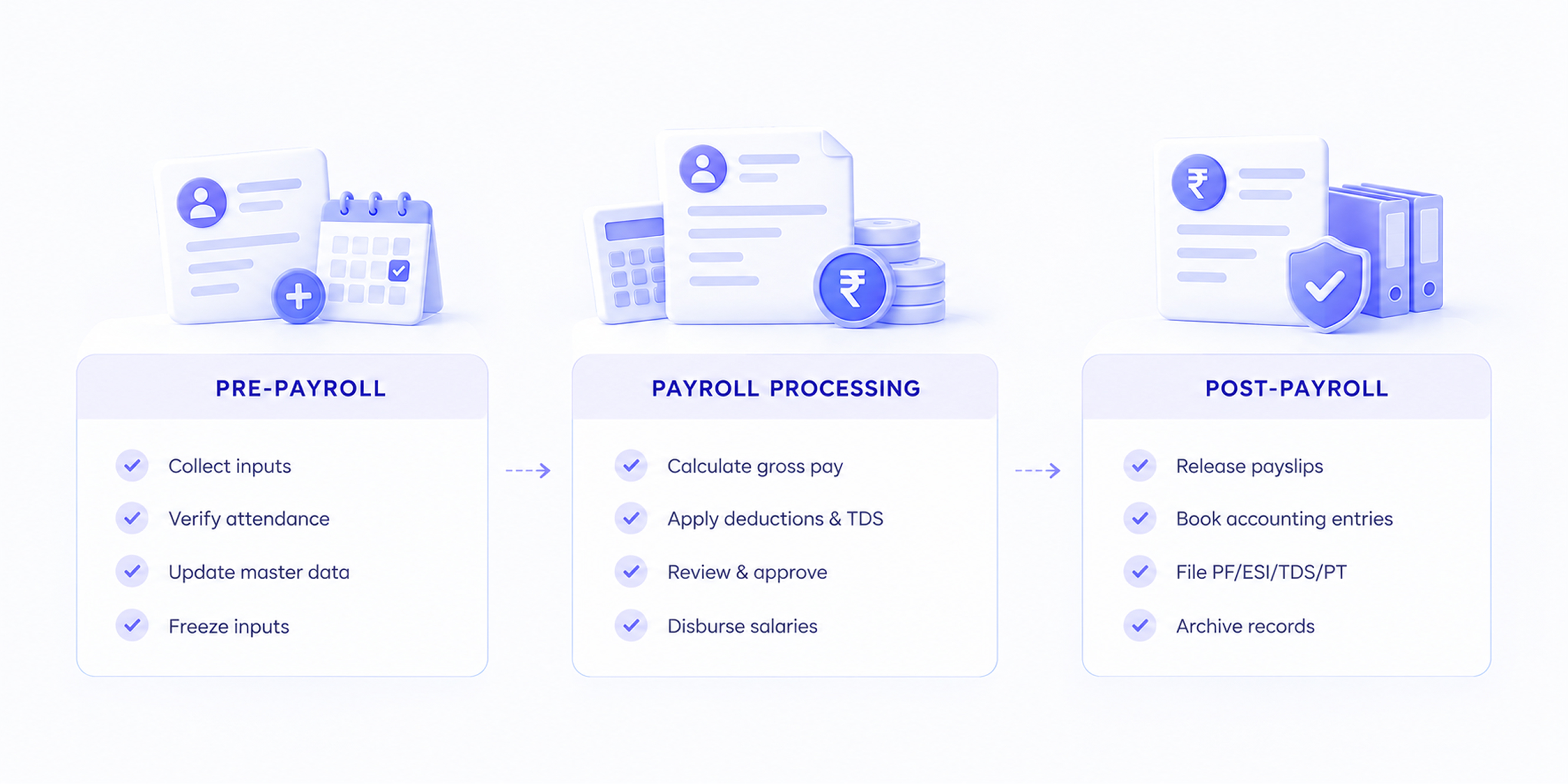
The payroll management process runs in three broad phases. These are the payroll stages most organizations follow:
Phase 1: Pre-payroll
Collect and verify inputs: new joiners, exits, attendance, leave, overtime, investment declarations, and salary revisions.
Phase 2: Payroll processing
Calculate gross pay, apply deductions and taxes, review the payroll register, get approvals, and disburse salaries.
Phase 3: Post-payroll
Generate payslips, update accounting records, file statutory returns, and archive records.
Payroll process
Here is the payroll process, step by step. Answering “how to process payroll” starts with this sequence.
- Collect employee data: Gather joining details, bank accounts, PAN, UAN, and salary structures.
- Capture attendance and leave: Finalize days worked, loss-of-pay days, overtime, and holidays for the cycle.
- Collect inputs and changes: Record bonuses, incentives, reimbursements, arrears, and salary revisions.
- Calculate gross pay: Apply the salary structure to the paid days to arrive at earnings.
- Apply deductions and taxes: Calculate PF, ESI, PT, LWF, TDS, and any loan recoveries.
- Review the payroll register: Compare with the previous month and investigate unusual variances.
- Get approvals: Finance or HR leadership signs off the final numbers.
- Disburse salaries: Transfer net pay through bank files or direct integration.
- Generate payslips: Share payslips with employees via email or a self-service portal.
Post-payroll process
Payroll does not end when salaries are credited. The post-payroll process closes the loop:
- Statutory payments and returns: Deposit PF, ESI, PT, and TDS and file the related returns within due dates.
- Accounting entries: Post payroll journals to the general ledger and reconcile bank payments.
- Employee queries: Resolve payslip questions and correct errors through supplementary payouts or next-cycle adjustments.
- Year-end activities: Issue Form 16, reconcile TDS, and support employees with tax filings.
- Record keeping: Archive payroll registers, challans, and returns for audits.
Different options for running payroll for your organization
Excel-based payroll management
Excel works for very small teams with simple salary structures. It is inexpensive and flexible. But it needs manual updates every month, version control is weak, formulas break, and statutory changes must be tracked by hand. Risk of error and data exposure grows with every new employee.
Payroll outsourcing
An outsourced payroll provider runs calculations, payouts, and compliance filings for you. It reduces the load on your HR team and brings expertise. The trade-offs are less control, ongoing service fees, slower turnaround for changes, and sharing sensitive data with a third party.
Using payroll software
Payroll software automates calculations, compliance, payslips, and reporting, and integrates with attendance, HR, and accounting tools. It scales with headcount and keeps rules updated. This is the most common choice for growing companies, and the main decision is between cloud and on-premise deployment.
Cloud-based software vs on-premise solutions
|
Factor |
Cloud-based payroll |
On-premise payroll |
|
Deployment |
Hosted by the vendor, accessed via browser |
Installed on your own servers |
|
Upfront cost |
Low, usually subscription-based |
High, with licences and hardware |
|
Maintenance |
Handled by the vendor |
Handled by your IT team |
|
Updates |
Automatic, including statutory changes |
Manual installs and patches |
|
Accessibility |
Anywhere with internet access |
Usually limited to office network |
|
Scalability |
Easy to add users and employees |
Needs added infrastructure |
|
Security |
Vendor-managed, with certifications |
Controlled in-house, but your responsibility |
|
Customization |
Configurable within platform limits |
Deeper customization possible |
|
Implementation time |
Faster |
Slower |
Cloud-based payroll management system
A cloud-based payroll management system runs on the vendor’s secure servers and is accessed through a web browser or mobile app. You do not install or maintain software, and compliance updates arrive automatically.
Benefits of cloud-based payroll management
- Lower cost of ownership: No servers or dedicated IT maintenance.
- Automatic compliance updates: Tax slabs, PF, ESI, and PT changes are applied by the vendor.
- Anywhere access: HR, finance, and employees can work from any location.
- Faster implementation: Go live in weeks rather than months.
- Scalability: Add employees, entities, or locations without new infrastructure.
- Integrations: Connect with attendance, HRMS, and accounting tools.
- Employee self-service: Payslips, declarations, and tax documents are available on demand.
- Data backup: Vendor-managed backups and disaster recovery reduce the risk of data loss.
Challenges in handling the payroll management process
Even experienced teams run into these issues:
- Changing regulations: PF, ESI, PT, and TDS rules change often, and PT and LWF differ by state.
- Data errors: Wrong attendance, bank, or PAN details cause incorrect or failed payouts.
- Tight deadlines: Late inputs squeeze the processing window.
- Complex salary structures: Multiple allowances, variable pay, and arrears raise the risk of miscalculation.
- Multi-location compliance: Different states mean different PT slabs and registrations.
- Data security: Salary data is confidential and needs controlled access.
- Employee queries: Payslip questions and tax declaration issues consume HR time.
- Reconciliation: Matching payroll to accounting and statutory records takes effort.
How a payroll management system works
Here is how a payroll management system works from setup to reporting:
- Set up the company profile. Add legal entities, locations, pay groups, and statutory registrations such as PF, ESI, PT, and TAN.
- Configure salary structures. Define earning and deduction components, formulas, and eligibility rules.
- Import employee data. Upload employee records, bank details, tax details, and salary assignments.
- Sync attendance and leave. Connect your attendance system or upload data to determine paid days.
- Add monthly inputs. Enter variable pay, reimbursements, arrears, and loan recoveries.
- Run payroll. The system calculates gross pay, deductions, TDS, and net pay for every employee.
- Review and approve. Check the payroll register and variance reports, then approve.
- Disburse and distribute. Generate bank files, pay salaries, and release payslips to the employee portal.
- File and report. Produce statutory reports, challans, and returns, and sync payroll journals to accounting.
How to choose the best payroll management system
Use these criteria when evaluating options:
- Compliance coverage: It should support PF, ESI, PT, LWF, TDS, and Form 16 for every state you operate in, with prompt updates.
- Ease of use: HR teams and employees should be able to use it without long training.
- Integrations: Look for connections to your attendance, HRMS, accounting, and banking tools.
- Scalability and flexibility: It should handle growth in headcount, entities, and complex pay structures.
- Security and reliability: Check for role-based access, encryption, audit trails, backups, and uptime commitments.
- Support and total cost: Evaluate implementation help, support quality, and pricing, including add-ons, not just the headline rate.
Why should you consider Entries AI for payroll management?
Entries AI brings automation and intelligence to payroll so your team spends less time fixing data and more time on the work that matters.
What sets Entries AI apart
- AI-assisted accuracy: Flags unusual entries and variances before payroll is finalized, helping prevent errors that would otherwise reach employees.
- Compliance built in: Supports Indian statutory requirements, with calculations and filings aligned to current rules.
- Faster payroll runs: Automates data collection, calculation, and approvals to shorten the monthly cycle.
- Connected workflows: Links payroll with attendance, accounting, and employee records to cut duplicate data entry.
- Employee self-service: Employees view payslips and tax documents on their own, which reduces queries to HR.
- Clear reporting: Real-time visibility into payroll costs, deductions, and compliance status.
See how automated payroll management can save your team's time every month with simplified payroll! Book a demo
Frequently Asked Questions (FAQs)
What is payroll processing?Payroll processing is the series of steps used to calculate and pay employees for a pay period. It involves collecting attendance and compensation inputs, computing gross pay, applying deductions and taxes, disbursing net pay, generating payslips, and filing statutory returns. It is a core part of the wider payroll management process. |
What are the types of payroll?The common types of payroll are:
|
|
How long does it take for payroll to process? It depends on company size, data quality, and the tools in use. Manual payroll takes days each month, since data collection, calculation, and checks are all done by hand. With a payroll management system and clean inputs, processing itself can often be done in a few hours. Bank transfers typically credit employee accounts within one to two working days, depending on the payment method. |
What are the steps involved in the Indian payroll process?The payroll process in India follows these steps:
|

Nagendra Raju
Co-founder of Entries.AI, leading the charge in building a unified business application that simplifies how SMBs operate today. Instead of juggling multiple-point solutions, SMBs can now rely on a single, seamless system that connects their entire workforce, operations, accounting, and finance functions.